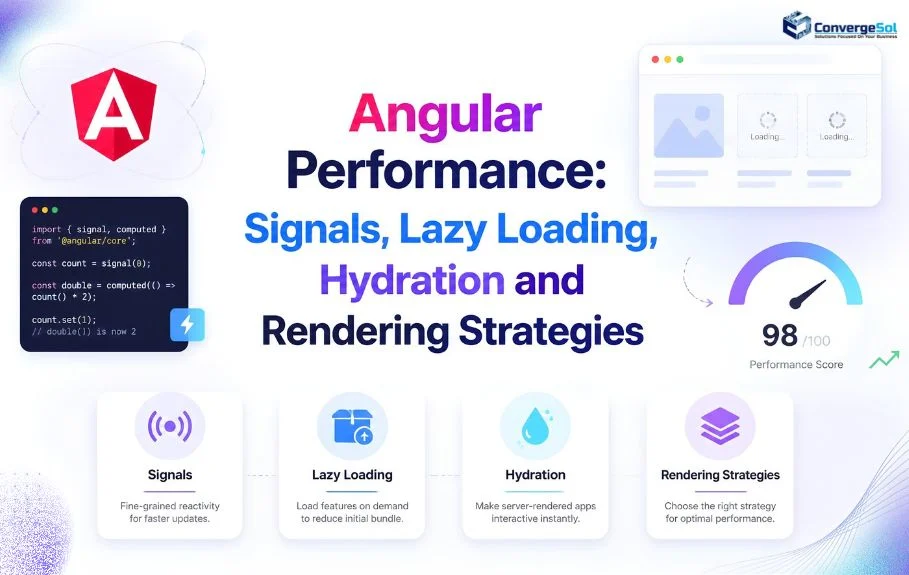
Angular Performance: Signals, Lazy Loading, Hydration and Rendering Strategies
Introduction: Why Angular Performance Matters for Modern Applications
A slow Angular application can affect more than user experience. It can reduce customer engagement, frustrate employees, increase infrastructure costs, and make complex business workflows harder to manage.
Consider a financial services platform where analysts review thousands of transactions, a SaaS application with interactive reporting dashboards, or an enterprise portal that manages customer records across multiple systems. If pages take too long to load or interactions feel delayed, even well-designed functionality becomes less effective.
Modern Angular provides several tools to address these challenges. Signals improve reactive state management, lazy loading reduces the amount of JavaScript loaded initially, and server-side rendering (SSR) with hydration can improve initial content delivery and search visibility. Combined with effective caching, optimized change detection, and performance monitoring, these techniques help applications remain responsive as they scale.
However, no single optimization solves every performance problem. A faster initial page does not automatically mean smoother interactions, and a smaller bundle does not guarantee better server response times.
This guide explains how to optimize Angular applications using practical examples, architectural recommendations, and measurable performance targets. It is particularly relevant to enterprise teams working on SaaS products, financial technology platforms, customer portals, and data-intensive applications.
Key Takeaways:
- Optimize reactive state: Use Signals and
computed()for efficient state management and RxJS for asynchronous workflows. - Reduce initial load time: Apply lazy loading, code splitting, and @defer to minimize upfront JavaScript.
- Choose the right rendering strategy: Use CSR, SSR, or SSG based on interactivity, SEO, and content requirements.
- Improve rendering efficiency: Use hydration, OnPush, and efficient DOM updates to reduce unnecessary work.
- Optimize APIs and assets: Reduce redundant requests, optimize images and fonts, and implement appropriate caching.
1. Understanding Angular Performance Fundamentals
Before changing an application's architecture, identify what is actually slowing it down.
Angular performance problems generally fall into four categories.
Initial loading performance
Users may wait too long before seeing meaningful content because of:
- Large JavaScript bundles.
- Unoptimized images, fonts, and stylesheets.
- Excessive third-party scripts.
- Slow server responses.
- Too many dependencies loaded on the initial route.
Runtime performance
Applications can become sluggish after loading when they perform unnecessary computations, update too many components, or render large datasets inefficiently.
Common causes include expensive template expressions, repeated array processing, unnecessary change detection, and poorly managed reactive subscriptions.
Network and data-fetching performance
Repeated API requests, sequential network calls, oversized responses, and missing caching strategies can increase latency even when the Angular frontend is well optimized.
Rendering and hydration performance
Client-side rendering, server-side rendering, and hydration affect how quickly users see content and begin interacting with it. An incorrect rendering strategy or hydration mismatch can introduce additional work and visible layout changes.
The practical principle: Measure loading, responsiveness, rendering, and network activity separately before deciding which optimization to implement.
2. How Angular Signals Improve Application Performance
Angular Signals provide a reactive way to represent state and track dependencies between values. When a signal changes, Angular can identify the dependent computations and update the relevant parts of the application.
This is especially useful in enterprise applications with interconnected forms, filters, dashboards, and frequently updated data.
For implementation details and supported reactive patterns, refer to the official Angular Signals documentation.
Understanding signal(), computed(), and effect()
Angular provides three important signal APIs.
- signal() creates a writable reactive value.
computed()derives a value from other signals and caches the result until its dependencies change.effect()runs a side effect when the signals it reads change.
Consider a transaction dashboard that displays the total number and value of transactions.
import { Component, computed, signal } from '@angular/core'; @Component({ selector: 'app-transaction-summary', standalone: true, template: `
Transactions: {{ transactions().length }}
Total value: {{ totalValue() }}
` }) export class TransactionSummaryComponent { transactions = signal([ { id: 1, amount: 250 }, { id: 2, amount: 450 }, { id: 3, amount: 300 } ]); totalValue = computed(() => this.transactions().reduce( (sum, transaction) => sum + transaction.amount, 0 ) );
Here, totalValue() is derived from the transaction signal. Angular's computed signal caches the result and recalculates it when the dependency changes.
This is preferable to repeatedly performing the same aggregation in a template expression.
When should you use effect()?
Use effects for genuine side effects, such as synchronizing state with browser storage or logging changes.

For production applications, use browser APIs only in an appropriate browser context, and manage effect lifecycles correctly.
Avoid using effects to copy one signal into another when a computed() signal would express the relationship more clearly. Unnecessary effects can introduce complex update flows and make state harder to maintain.
Signals vs. RxJS: Which should you choose?
Signals and RxJS solve related but different problems.
| Requirement | Recommended approach |
|---|---|
| Current component or UI state | Signals |
| Derived values and calculations | computed() |
| Search input with debounce | RxJS |
| Combining asynchronous streams | RxJS |
| HTTP requests and cancellation | RxJS with Angular HttpClient |
| Displaying observable data in templates | async pipe or conversion to signals |
| Complex reactive workflows | RxJS, Signals, or a deliberate combination |
For example, a transaction search may use RxJS to debounce user input and cancel outdated requests, while Signals manage the selected filters and displayed results.
The goal is not to replace every observable with a signal. It is to use the simplest reactive model for each requirement.
For a deeper comparison of reactive state management approaches, explore Angular Signals vs. RxJS for enterprise applications to understand when each approach is most suitable for scalable Angular projects.
Enterprise recommendation: Standardize how your team manages asynchronous data, UI state, and derived values. Consistency reduces maintenance costs while helping developers identify unnecessary work.
3. Lazy Loading and Code Splitting in Angular
Lazy loading delays the download and initialization of features until they are needed. It helps reduce the initial JavaScript payload, particularly in applications with multiple modules, dashboards, reporting tools, and administrative sections.
Angular supports lazy loading through loadComponent() and loadChildren().
For additional implementation guidance, see Angular's official documentation on lazy-loaded routes, including how route-level code splitting can reduce the initial JavaScript payload.
Lazy loading standalone components
For an application where users enter through a landing page but access reports only occasionally, lazy-load the reporting component.

Angular can place the reporting component and its eligible dependencies into a separate chunk.
This avoids downloading that feature's code simply because a user opens another route.
Lazy loading feature routes
For a larger application with several related screens, lazy-load a route configuration.

The ADMIN_ROUTES export contains the routes associated with the administrative feature.
This approach is useful for SaaS platforms, financial reporting systems, and enterprise applications with distinct functional areas.
Use @defer for heavy components
Angular's @defer block can delay loading eligible standalone components and their dependencies.

The chart can load when its placeholder approaches the viewport, rather than being included in the initial rendering work.
Use @defer for secondary charts, large interactive widgets, and below-the-fold content. Avoid deferring critical above-the-fold content without evaluating the effect on perceived performance and layout stability.
Bundle-size optimization checklist
- Inspect production bundle reports.
- Remove unused dependencies and duplicate libraries.
- Import only the required functionality from large packages.
- Lazy-load infrequently used routes and features.
- Use @defer for appropriate heavy components.
- Avoid eagerly loading every charting, PDF, or editor library.
- Review third-party scripts and their impact on the main thread.
Lazy loading does not automatically make an entire application faster. It redistributes when code is downloaded and executed, so test both initial navigation and the first visit to each lazy-loaded feature.
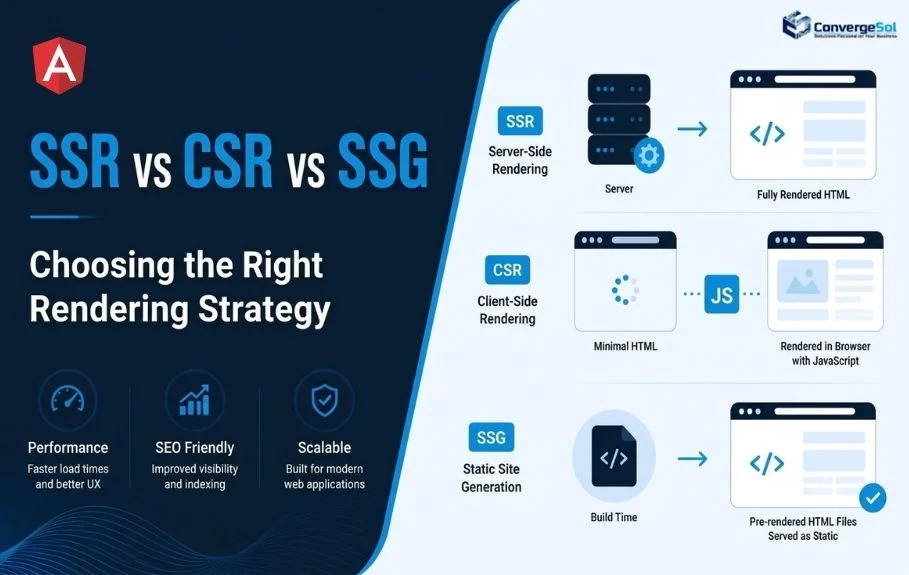
4. Angular SSR, CSR, and SSG: Choosing the Right Rendering Strategy
Rendering strategy influences initial content delivery, server workload, caching, and SEO.
Angular supports client-side rendering, server-side rendering, and build-time prerendering. Hybrid rendering allows different routes to use different strategies where appropriate.
Choosing between Angular SSR, CSR, and SSG rendering strategies depends on your application's SEO requirements, initial loading performance, interactivity, and data-fetching needs.
Client-side rendering (CSR)
In CSR, the browser downloads JavaScript and executes Angular to render the interface.
Best suited for:
- Authenticated internal dashboards.
- Interactive business tools.
- Applications where search visibility is not a primary requirement.
- Experiences that rely heavily on client-side interactions.
CSR can be effective, but users may have to wait for JavaScript execution before meaningful content appears.
Server-side rendering (SSR)
With SSR, the server generates HTML for a request before returning the response to the browser. Angular then hydrates the rendered application to restore client-side interactivity.
Best suited for:
- Public product and service pages.
- Content-heavy websites.
- Public documentation and knowledge portals.
- Landing pages where search visibility and initial content delivery matter.
SSR can improve the delivery of meaningful content, but the result depends on server response time, data-fetching costs, caching, and client-side JavaScript execution.
Static site generation (SSG) and prerendering
Prerendering generates HTML at build time for routes whose content can be prepared ahead of a request.
Best suited for:
- Blogs and articles.
- Product documentation.
- Public FAQs.
- Stable marketing and service pages.
Prerendered pages can be served efficiently through a CDN. Frequently changing or user-specific content may require SSR or client-side data fetching instead.
Which strategy should an enterprise application use?
| Application type | Practical starting point |
|---|---|
| Public company website | SSG or hybrid rendering |
| Technical blog or documentation | SSG |
| Public SaaS product pages | SSG or SSR |
| Authenticated financial dashboard | CSR or hybrid rendering |
| Frequently updated analytics portal | CSR or hybrid rendering |
| Public content with personalized features | SSR or hybrid rendering with client-side personalization |
The most effective architecture is often hybrid. Render public content for visibility and fast delivery, while keeping highly interactive, authenticated workflows client-driven where that makes sense.
5. Angular Hydration and Incremental Hydration
Server-rendered HTML provides an initial view of a page, but users also need that page to become interactive.
Hydration allows Angular to reuse the server-rendered DOM instead of destroying it and recreating the entire interface in the browser.
Angular provides configuration guidance and compatibility details in its official hydration documentation, which is useful when implementing SSR and resolving hydration issues.
Enabling client-side hydration
In an Angular application configured for SSR, hydration can be enabled through provideClientHydration().

Follow the setup generated by your Angular CLI version, as SSR-enabled projects may already include the required provider.
Hydration reduces unnecessary DOM reconstruction and can help avoid visible flickering and layout shifts.
Understanding incremental hydration
Incremental hydration allows eligible sections of a server-rendered application to remain unhydrated until a specified trigger occurs.
For example, a content page might render its main article immediately while delaying hydration of a secondary interactive widget.

Incremental hydration works with Angular's deferrable views and event replay. Exact configuration and supported triggers depend on the Angular version and application setup.
This is useful when a page contains several interactive sections but users typically engage with only one or two.
Avoiding hydration mismatches
Hydration errors can occur when the HTML generated on the server differs from the DOM Angular expects in the browser.
Common causes include:
- Direct DOM manipulation before hydration.
- Invalid HTML nesting.
- Different server and browser rendering conditions.
- Random values or timestamps generated independently on each side.
- Third-party scripts that modify the DOM too early.
- Browser-only APIs accessed during server rendering.
Use Angular-managed rendering, valid HTML, consistent initial state, and appropriate browser-only initialization. Where server and client must share data, consider Angular's HTTP transfer cache and other supported state-transfer mechanisms.
Important: SSR, hydration, and incremental hydration are complementary techniques. SSR provides the initial HTML, hydration restores interactivity, and incremental hydration can defer work for selected sections.
6. Optimizing Change Detection and Component Rendering
As an Angular application grows, unnecessary rendering work can affect responsiveness.
Signals, OnPush, efficient component boundaries, and modern Angular patterns help reduce avoidable work.
Use OnPush change detection
For a component that receives data through inputs, OnPush can reduce unnecessary checking in appropriate component trees.

The example uses Angular's signal-based input API. For older Angular versions, the conventional @Input() decorator is also available.
Avoid mutating input objects in place when relying on reference-based change detection. Prefer clear, predictable state updates.
Track repeated elements efficiently
Use stable identifiers when rendering lists.

Tracking by a stable ID helps Angular reuse existing DOM nodes when items are inserted, removed, or updated.
For large datasets, also consider pagination, virtualization, and server-side filtering. Rendering thousands of rows at once can be expensive regardless of the state-management approach.
Keep templates lightweight
Avoid expensive calculations directly in templates, repeated transformations, and functions that perform significant work every time they are evaluated.
Instead, calculate derived values when their dependencies change, use computed() for signal-based derivations, and move complex business logic into testable services or dedicated functions.
For new applications, evaluate zoneless change detection where supported by your Angular version and dependencies. It can reduce overhead associated with ZoneJS, but migration requires testing third-party libraries, asynchronous updates, and existing change-detection assumptions.
7. Optimize Images, Fonts, JavaScript, and Third-Party Libraries
Frontend performance is not determined by Angular alone. Static assets and third-party code can contribute substantially to loading delays.
Optimize images
- Use appropriately sized images and modern formats such as WebP or AVIF where supported.
- Provide responsive image sources for different screen sizes.
- Reserve image dimensions to reduce layout shifts.
- Lazy-load below-the-fold images.
- Avoid lazy-loading the primary above-the-fold image when it is the Largest Contentful Paint element.
Angular's image optimization capabilities can help generate responsive image markup and prioritize important images when configured appropriately.
Improve font delivery
Use modern font formats, limit unnecessary font weights, and consider self-hosting fonts when appropriate. Preload only critical fonts that are needed for the initial viewport.
Avoid loading multiple font families and weights when the design requires only a small subset.
Audit third-party scripts
Analytics, chat widgets, advertising tools, customer-support integrations, and session-recording scripts can consume main-thread time.
Load nonessential scripts after critical content, review whether each integration is necessary, and monitor its effect on interaction responsiveness.
Keep JavaScript payloads manageable
Review dependencies after upgrades, inspect production chunks, and avoid importing entire libraries for small features. Consider lighter alternatives where they meet functional and security requirements.
These steps are especially important for enterprise SaaS products with rich interfaces and multiple third-party integrations.
Application performance also depends on reliable infrastructure, deployment architecture, and resource management. Learn more about cloud solutions for scalable applications and how cloud architecture can support growing workloads.
8. Reduce API Latency and Improve Data Fetching
Even a well-optimized Angular frontend can feel slow if the backend sends redundant or oversized responses.
Prevent unnecessary API requests
- Debounce search input where appropriate.
- Cancel outdated requests when the user changes a search query.
- Avoid duplicate requests triggered by repeated subscriptions.
- Combine related requests when the backend supports it.
- Request only the fields needed for the current screen.
- Use pagination for large datasets.
- Cache data that can safely be reused.
For example, RxJS can help control the request flow for an account search:

In a complete implementation, render results$ using the async pipe or another appropriate subscription strategy. Configure request cancellation, error handling, and API parameters according to your backend contract.
The example illustrates how debouncing and switchMap() can avoid issuing a request for every keystroke and stop observing obsolete search requests.
Apply caching carefully
Caching can improve repeat navigation and reduce server load, but not all data should be cached in the same way.
Public reference data may be suitable for shared caching, while financial balances, customer records, and other sensitive information require carefully designed authorization, isolation, and freshness rules.
Use HTTP cache headers, CDN caching, application-level caching, and Angular's SSR transfer cache where appropriate. Never assume that a client-side cache is a substitute for server-side access control.
9. Measuring Angular Performance with the Right Tools
Optimization should be based on evidence rather than assumptions.
Use the following tools to identify bottlenecks and validate improvements.
For definitions of the key user-experience metrics and their recommended thresholds, consult Google's Core Web Vitals guidance.
Lighthouse: Evaluate loading performance, accessibility, SEO, and other quality indicators under a controlled test environment.
Chrome DevTools: Inspect network waterfalls, JavaScript execution, long tasks, memory usage, rendering activity, and layout shifts.
Angular DevTools: Profile component change detection and investigate component-tree behavior.
Core Web Vitals: Monitor real-world loading, responsiveness, and visual stability.
The main Core Web Vitals targets are:
| Metric | Good performance target | What it measures |
|---|---|---|
| Largest Contentful Paint (LCP) | 2.5 seconds or less | Loading |
| Interaction to Next Paint (INP) | 200 milliseconds or less | Responsiveness |
| Cumulative Layout Shift (CLS) | 0.1 or less | Visual stability |
These targets should generally be evaluated at the 75th percentile of real-user page loads, segmented by mobile and desktop. Passing a Lighthouse test does not guarantee that real users will experience the same results.
Establish a performance baseline
Before implementing changes, record:
- Initial JavaScript transfer size.
- Time to first meaningful content.
- LCP, INP, and CLS.
- API response times.
- Number of network requests.
- Time spent on scripting and rendering.
- Memory usage on representative workflows.
Then apply one major optimization at a time and compare results under consistent conditions.
10. Practical Before-and-After Performance Example
Consider a hypothetical enterprise financial dashboard that initially loads all reporting features, downloads a large charting library, makes duplicate API requests, and recalculates summary values unnecessarily.
A structured optimization plan could include:
- Lazy-load the reporting routes and charting components.
- Use Signals and
computed()for derived dashboard values. - Apply OnPush where it fits the component architecture.
- Replace unbounded table rendering with pagination or virtualization.
- Eliminate duplicate requests and introduce appropriate caching.
- Profile rendering and network activity before and after the changes.
The expected outcomes are a smaller initial payload, less unnecessary computation, fewer redundant requests, and improved interaction responsiveness.
For illustration, suppose the initial JavaScript transfer size falls from 1.8 MB to 1.1 MB after route splitting and dependency cleanup. That would represent an approximate 39% reduction.
These figures are illustrative, not measured results from a real ConvergeSol project. Actual improvements depend on the application architecture, compression, dependency graph, user device, network conditions, and deployment environment.
For a real-world example of scalable Angular-based SaaS development, explore ConvergeSol's SaaS vacation rental booking platform case study. The solution combines AngularJS, .NET, Elasticsearch, and MongoDB to support property searches, bookings, and scalable platform operations.
For a credible case study, publish the original and final measurements, the testing methodology, the affected routes, and the production conditions. Do not present estimated improvements as verified business results.
11. Common Angular Performance Mistakes and How to Fix Them
Mistake: Loading every feature on startup.
Fix: Introduce route-level lazy loading and defer eligible noncritical components.
Mistake: Recalculating expensive values in templates.
Fix: Use computed() or appropriately memoized calculations and profile the resulting behavior.
Mistake: Replacing every RxJS observable with Signals.
Fix: Choose Signals for state and derived values, while retaining RxJS for asynchronous streams and event-driven workflows where it is more suitable.
Mistake: Enabling SSR without evaluating hydration.
Fix: Configure hydration correctly and check for DOM mismatches, duplicate requests, and layout shifts.
Mistake: Lazy-loading critical above-the-fold content.
Fix: Prioritize essential content and defer secondary functionality without creating a worse initial experience.
Mistake: Caching sensitive or frequently changing data incorrectly.
Fix: Define cache policies around authorization, data freshness, and user isolation.
Mistake: Optimizing for a single Lighthouse score.
Fix: Combine lab testing with field data, realistic devices, and representative user journeys.
Mistake: Making changes without a baseline.
Fix: Measure before and after each significant optimization, and retain the evidence.
12. Production Deployment Checklist for Angular Applications
Before releasing performance improvements, review the following checklist.
- Generate and inspect optimized production builds.
- Verify route-level lazy loading and bundle sizes.
- Remove unused dependencies and unnecessary third-party scripts.
- Confirm that Signals and derived computations are implemented appropriately.
- Test change detection and large-list rendering.
- Select CSR, SSR, or SSG based on route requirements.
- Validate hydration and resolve server-client DOM mismatches.
- Optimize images, fonts, and critical rendering resources.
- Verify API request patterns, caching, and error handling.
- Check authentication, authorization, and sensitive-data caching.
- Test on representative mobile devices and slower networks.
- Monitor Core Web Vitals and backend performance after deployment.
- Add regression checks for critical performance budgets.
Performance optimization is an ongoing engineering responsibility. Dependency updates, new features, changing datasets, and third-party integrations can gradually increase the cost of loading and running an application.
13. How Angular Performance Optimization Supports Enterprise Growth
Performance becomes increasingly important as enterprise applications expand in scope and complexity.
For SaaS platforms, faster navigation and responsive interfaces can make workflows easier to complete. In fintech software development, efficient data handling and carefully controlled caching can support demanding analytical interfaces without compromising security. In enterprise portals, route-level code splitting and efficient rendering help manage growing feature sets.
For financial institutions, these improvements are particularly important when building secure, data-intensive platforms. Explore ConvergeSol's technology solutions for financial services companies to learn how technology can support complex financial workflows.
Performance also influences broader technology decisions. Teams delivering custom software development projects should consider performance budgets, rendering architecture, API contracts, and observability during the design stage rather than treating optimization as a final release activity.
Organizations planning a new application or modernizing an existing platform can explore our custom software and product development solutions to support their scalability, maintainability, and long-term business goals.
Organizations adopting AI solutions for enterprises should evaluate the same principles when building AI-powered interfaces. Streaming responses, background processing, efficient data retrieval, and deferred loading can improve perceived responsiveness without unnecessarily blocking the main thread.
Likewise, Salesforce consulting services and complex CRM integrations can benefit from careful management of API calls, component rendering, and third-party dependencies when Angular is used alongside enterprise platforms.
An experienced AI solution provider or SaaS product development partner should be able to explain not only which technologies are being introduced, but also how the resulting application will be measured, secured, maintained, and scaled.
14. Future Trends in Angular Performance Engineering
Angular performance engineering continues to evolve around more precise rendering control, reactive state management, and reducing unnecessary client-side work.
Three developments deserve attention:
More granular rendering and hydration: Incremental hydration and deferrable views provide additional control over when different parts of a page become interactive.
Signal-driven application architecture: Signals make dependencies between application state and rendered values more explicit, supporting maintainable reactive designs.
More deliberate client-server boundaries: Hybrid rendering, caching, and selective data delivery allow teams to balance initial content delivery against server costs and client-side interactivity.
Teams should evaluate these capabilities against their Angular version, dependencies, operational requirements, and measured performance needs. Adopting a new feature is valuable only when it improves the application or simplifies its architecture.
Conclusion
High-performance Angular applications are built through a combination of efficient state management, intelligent code splitting, appropriate rendering strategies, careful hydration, optimized data fetching, and continuous measurement.
Signals and computed() help manage reactive state and derived values. Lazy loading and @defer reduce unnecessary upfront work. SSR and prerendering improve how appropriate pages deliver initial content, while hydration helps restore interactivity without recreating the entire DOM. Profiling tools and Core Web Vitals then provide the evidence needed to prioritize and validate improvements.
For enterprise teams, the objective is not simply to make an application load faster. It is to create a reliable, responsive, maintainable experience that continues to perform as features, data volumes, and user expectations grow.
Building or modernizing an enterprise Angular application?
ConvergeSol is a US-based custom software development and technology consulting partner helping businesses across the United States and around the world build scalable Angular applications, SaaS products, and enterprise technology platforms. We focus on performance, maintainability, and measurable business outcomes.
Explore our product development solutions or contact our team to discuss your application architecture and performance goals.
Frequently Asked Questions
1. How do Angular Signals improve performance?
Signals track reactive dependencies and notify Angular when values change. computed() caches derived values until their dependencies change, helping avoid repeated calculations. Actual rendering improvements depend on the application's component structure and update patterns.
2. Is lazy loading better than eager loading in Angular?
Lazy loading is useful for features that users do not need immediately because it can reduce the initial JavaScript payload. Eager loading can still be appropriate for small, essential components or features required immediately after startup.
3. Should I use SSR or CSR for an Angular application?
Use SSR when initial content delivery and public-page SEO are important. CSR can be suitable for highly interactive authenticated applications. SSG works well for content that can be generated at build time. Hybrid rendering can combine these approaches across routes.
4. Does Angular hydration improve SEO?
Hydration primarily restores client-side interactivity while reusing server-rendered DOM. SSR or prerendering is what makes the initial HTML available before client-side rendering completes. Together, these techniques can support performance and search visibility, although neither guarantees better rankings.
5. How can I measure Angular performance improvements?
Use Lighthouse and Chrome DevTools for controlled testing, Angular DevTools for component profiling, and real-user monitoring for Core Web Vitals. Compare results before and after changes using consistent conditions and representative workflows.
6. Can Angular Signals replace RxJS?
No. Signals are well suited to reactive state and derived values, while RxJS remains valuable for asynchronous streams, event processing, debouncing, cancellation, and complex request workflows. Using both where appropriate often provides the clearest architecture.
7. What is the best way to optimize a large Angular enterprise application?
Start by identifying the largest bottlenecks. Reduce unnecessary JavaScript, lazy-load features, optimize data fetching, simplify rendering work, select appropriate rendering strategies, and establish measurable performance budgets. Validate improvements in production rather than relying only on local benchmarks.
Write your comment
Recent Blogs